
MountDev Ops CRM
Everything CRM does, how to set it up, who can see what, and the questions people ask.
What it is
MountDev Ops CRM is a customer relationship manager that runs inside WordPress and stores everything in the site's own database. It comes ready to use with five modules (Leads, Contacts, Companies, Deals and Tasks), a Sales pipeline, three boards, six saved views, five reports, two validation rules, a Turn a lead into a customer flow and three starter roles (Manager, Team member and Viewer). The team works in CRM on the Ops page of the site, a page with the [mountdev_ops] shortcode that shows inside the site's theme. Admins set CRM up in wp-admin under Ops: pipelines at Ops > CRM, modules, fields and rules at Ops > Setup, and people at Ops > Roles and teams. It is built on the shared MountDev Ops core, so it also has email from records, notes, files, tags, workflow and assignment rules, import and export, search, duplicate checks and privacy tools. When other MountDev Ops apps are installed, CRM is the one place that holds people and companies for all of them. It is for small and growing businesses that want a complete CRM without sending their customer data to anyone else.
Who it fits
Who it fits
- Small businesses and sales teams that sell to other businesses or to people, and want to track leads and deals: agencies, consultants, trades and contractors, service firms, clinics, shops with a sales team, and nonprofits that track contacts and organizations.
- Businesses that already run their website on WordPress and want their CRM on the same site, under their own control.
- Businesses that must keep customer data on their own server, or that answer privacy requests.
- Teams where some people should see only their own records and managers should see everyone's.
What it solves
- Leads get lost in inboxes and spreadsheets. Leads are kept in one list with a status and a source, then turned into a customer in one step with Make a customer, which shows what will happen first: a new contact, linked to their company, and a deal if wanted. See Modules and Records and fields.
- Nobody knows what is in the pipeline. Deals move through pipelines and stages, show on the Deals by stage board with totals per stage, and roll up into the Pipeline by stage and Won deals by month reports. See Boards and Reports.
- Follow-ups are forgotten. Tasks have due dates, reminders, a calendar, and the My open tasks and My overdue tasks views. See Activity and Calendar.
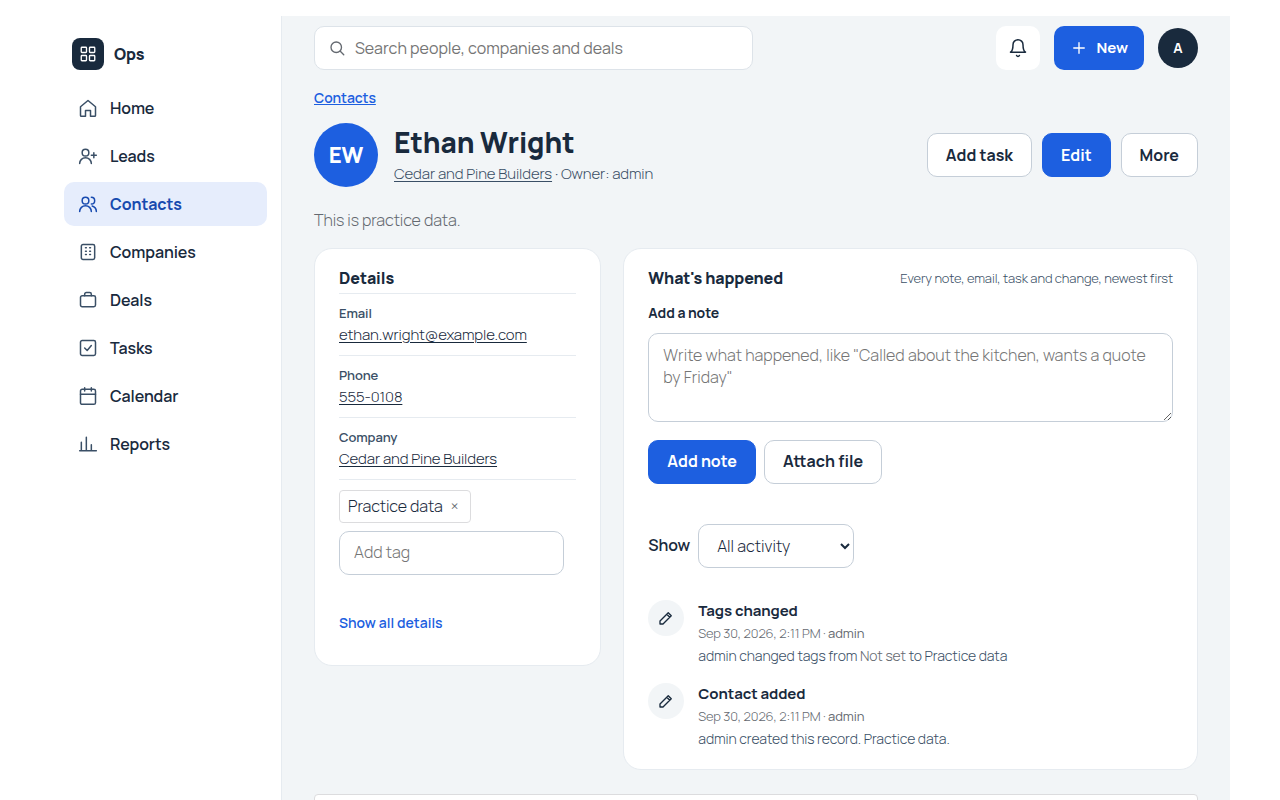
- Customer history is scattered. Each record page shows the key details on the left and What's happened on the right: notes, files, tags, logged emails, every change, and the linked tasks and deals. See Activity and Email.
- Repetitive admin work. Workflow rules update fields, notify people or create follow-up tasks, and assignment rules share out new records. See Automation.
- Duplicate records. Leads, contacts and companies warn about possible duplicates, and two records can be merged. See Duplicates.
- Customer data leaving the business. Everything stays in the site's database. CRM sends nothing to its makers or anyone else. See Connections and data.
- Privacy requests. Leads and contacts work with WordPress's export and erase tools from the start. See Privacy.
- A CRM that does not fit how the business works. Modules and fields can be renamed or hidden, and admins add their own fields, modules, pipelines, rules and roles. See Customization.
- Several business apps with the same customers. Other MountDev Ops apps link their people and companies to CRM contacts and companies, so details stay the same everywhere. See Modules.
Features
Everything in MountDev Ops CRM is free. MountDev Ops Pro adds nothing specific to CRM today.
Modules
Free Five built-in modules. CRM comes with Leads, Contacts, Companies, Deals and Tasks, each with its own list, record pages, forms and trash on the Ops page. Built-in modules and fields can be renamed or hidden but never deleted. Each module's records are stored in their own database table. Each module's screens open with one sentence saying what it's for (such as "The people you do business with: customers, suppliers and partners." for Contacts) and a help link named for it, such as How contacts work, to its part of the CRM docs. A module with no records yet shows "No contacts yet" and a sentence of its own, such as "Add the people you work with, and every call, email, note and deal with them stays in one place." for Contacts, "Add the people who might buy from you, and keep track of each one until they become a customer." for Leads, "Add the businesses you work with, and see their people, deals and tasks together." for Companies, "Add the sales and jobs you are working on, and move each one along as it progresses." for Deals, and "Add the calls, quotes and follow-ups you need to do, and see what is due each day." for Tasks. Docs
Free Leads. People or companies who might become customers. Fields: First name, Last name (required), Name (calculated from first and last name), Company, Title, Email, Phone, Mobile, Website, Lead status (New, Contacted, Qualified, Unqualified, Became a customer), How they found you (Website, Referral, Advertisement, Event, Cold call, Other), Street, City, State or region, Postal code, Country, Description and Email opt out (a checkbox). How they found you was called Lead source before core 1.56.0, and the Became a customer choice was called Converted before core 1.57.0 (its key stays converted); an update renames each only if an admin hadn't already renamed it, and records the rename in the activity log. Docs
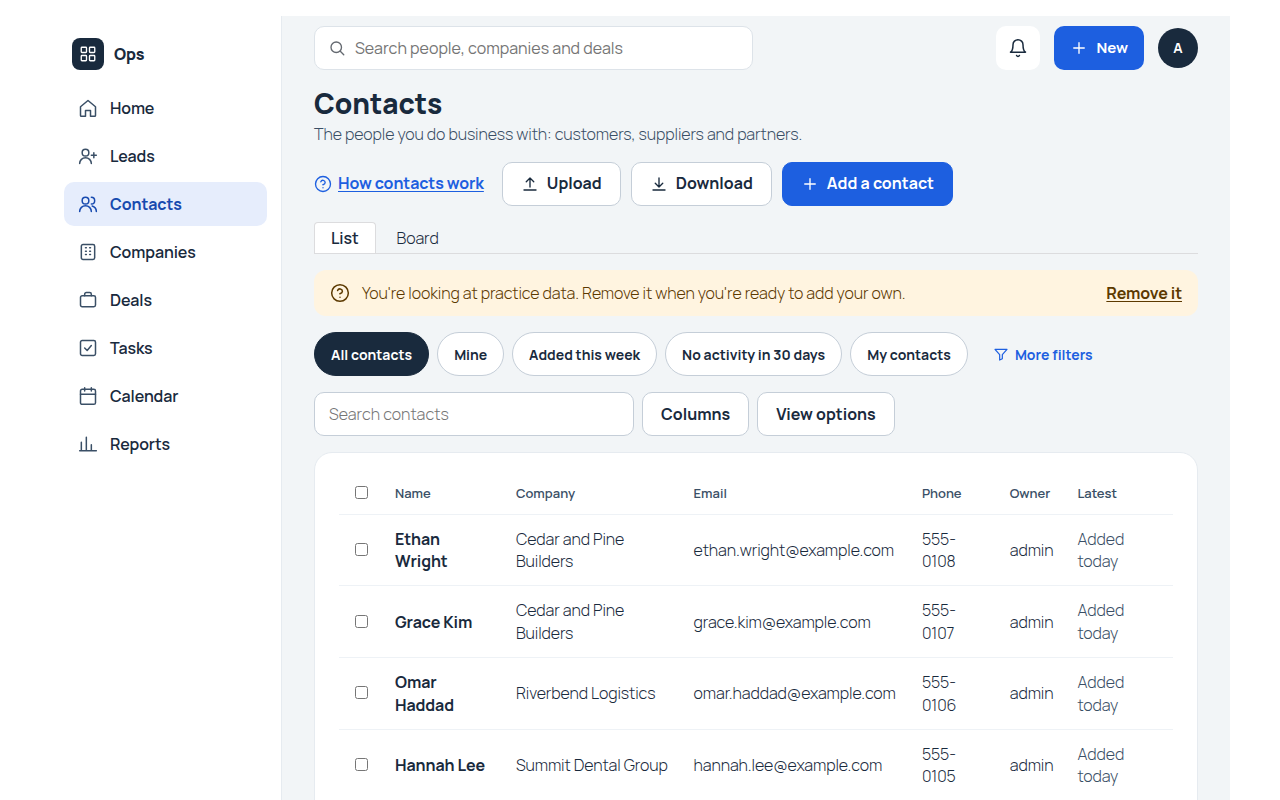
Free Contacts. The people the business works with. Fields: First name, Last name (required), Name (calculated), Company (a link to one company), Title, Email, Phone, Mobile, Street, City, State or region, Postal code, Country, Description, Open deals (a count of the contact's open deals, calculated), Email opt out (a checkbox) and How they found you (a dropdown with the same choices as the leads' field, added in core 1.56.0). The contact form and page group them in Who they are (names, email, phones and address, in 2 columns), Where they work (Company, with "Start typing to find a company, or add a new one.", and Title), More about them (How they found you, with "Helps you see which marketing works.", Description, Email opt out and the owner), then Summary. New sites get this layout; sites that had CRM before core 1.56.0 get it only if the Contacts layout was still exactly the old default, which is recorded in the activity log, and a changed layout is left alone. The contacts list shows Name, Company, Email, Phone, Owner and Latest. Docs
Free Companies. The companies and organizations the business works with. Fields: Company name (required), Website, Phone, Industry (Agriculture, Construction, Education, Finance, Healthcare, Hospitality, Manufacturing, Nonprofit, Professional services, Real estate, Retail, Technology, Other), Employees (whole numbers, 0 or more), Annual revenue (0 or more), Street, City, State or region, Postal code, Country, Description, and four calculated summary fields: Open deals, Open deal value, Won deal value and Contacts. Sites that had CRM before core 1.55.0 called this module Accounts; an update renames it, its Account name field and the Account links on contacts, deals and tasks to Companies, Company name and Company, each only if an admin hadn't already renamed it, and records each rename in the activity log. Docs
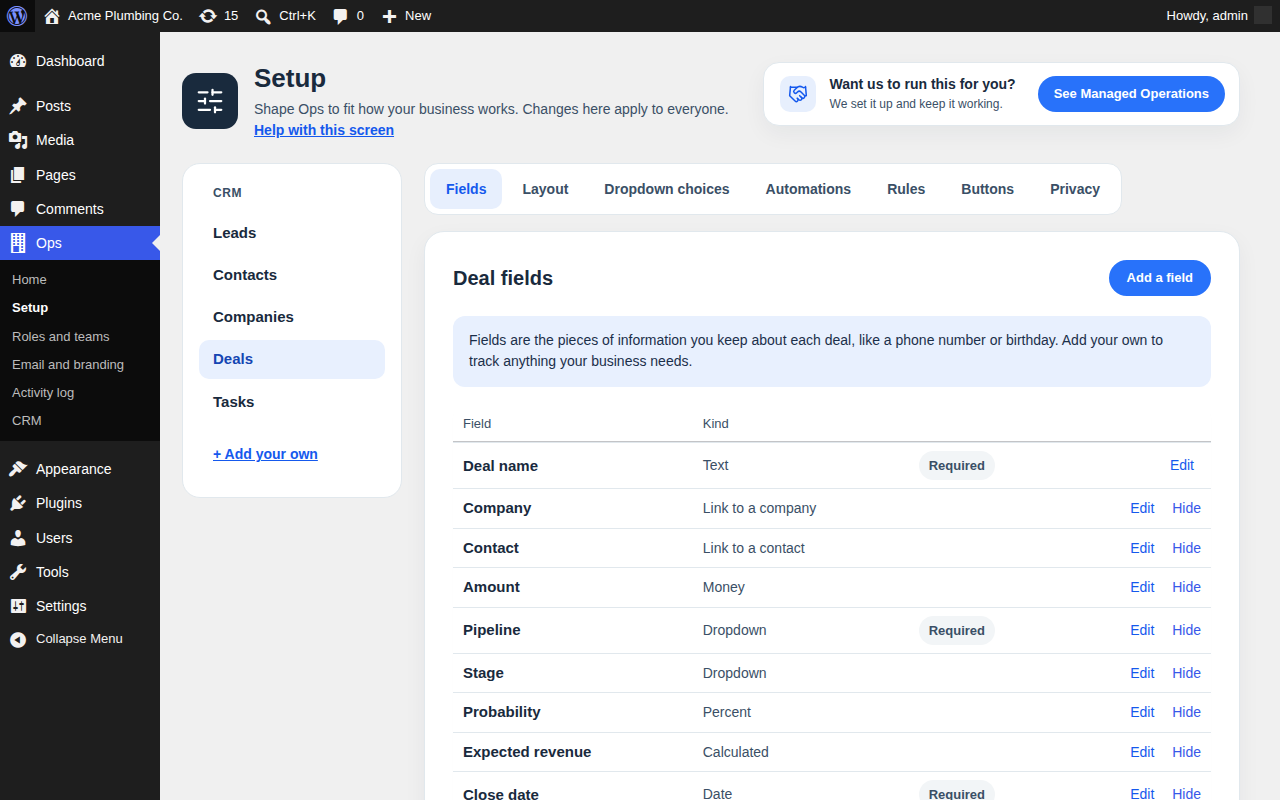
Free Deals. Sales in progress. Fields: Deal name (required), Company, Contact, Amount (0 or more), Pipeline (required), Stage, Probability (whole percent), Expected revenue (calculated as Amount times Probability), Close date (required), Lead source and Description. Docs
Free Tasks. Things to do. Fields: Subject (required), Due date, Remind me at (date and time), Status (Not started, In progress, Completed, Deferred), Priority (Low, Normal, High), Contact, Company, Deal and Description. Docs
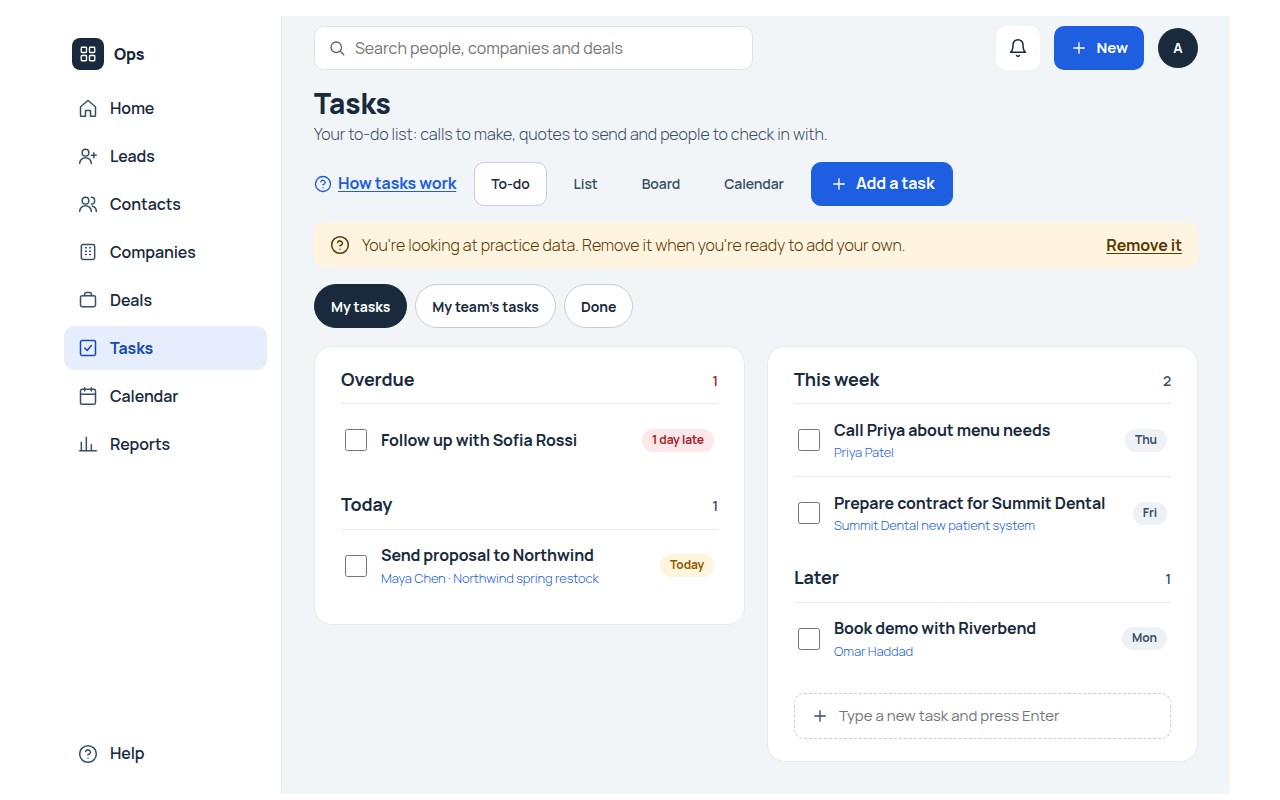
Free Tasks open on To-do. Tasks is a module of things to do (due on Due date, done when Status is Completed), so it opens on the To-do view: My tasks, My team's tasks and Done, with open tasks grouped Overdue, Today, This week and Later. Each task's checkbox sets Status to Completed, and unticking it sets it back to Not started. Each shows the contact, company or deal it's linked to, such as "Harbor Dental · Office restroom refit", and when it's due. Type a new task and press Enter adds one due today; Add a task opens the full form. The List tab is the regular list, and Tasks remembers which one each person picked. Docs
Free Pipelines and stages. Every deal belongs to one pipeline and sits at one of that pipeline's stages. CRM starts with one pipeline, Sales pipeline, the default, with the stages Qualification (10%), Needs analysis (20%), Proposal (60%), Negotiation (80%), Closed won (100%, won) and Closed lost (0%, lost). Ops Admins and people with Manage setup in CRM add, rename, reorder and remove pipelines and stages at Ops > CRM. Each stage has a name, a probability from 0 to 100 and a type (Open, Won or Lost), and each pipeline needs at least one stage of each type. Limits: up to 20 pipelines, up to 30 stages per pipeline, names of 1 to 100 characters, and stage names must differ within a pipeline. The default pipeline cannot be deleted. On the deal form, the Stage list only offers the chosen pipeline's stages, and every save checks this. Docs
Free Probability fills in from the stage. When a deal's stage is set or changes, its Probability becomes the stage's probability, unless the same save gives its own probability. This happens however the deal is saved, including board moves. Changing a stage's probability later does not change existing deals. Docs
Free Removing stages and pipelines safely. A stage or pipeline that no deal uses (in the trash or not) goes at once. One that deals use needs a place to move them: another stage of the same pipeline, or a stage of another pipeline. The deals are moved by a background job, Pipeline update, 100 at a time, as normal changes by the person who made the change, and that person is emailed when it finishes. Creating, changing, making default and deleting a pipeline are recorded in the Ops activity log. Docs
Free CRM is the hub for people and companies. CRM registers with the shared core as the provider of people (Contacts, matched by email) and companies (the Companies module, matched by Company name). Other MountDev Ops apps that store people or companies link their records to CRM, and shared details stay the same in both places: for people First name, Last name, Email, Phone, Mobile and the address fields; for companies Company name, Website, Phone and the address fields. Likely matches are people with the same first and last name, and companies with the same website domain. On a contact or company page, Linked in other apps lists the records linked to it that the person can view. Docs
Free Practice data. From the Practice data card on the wp-admin Home screen (or the guided setup), an Ops Admin can add CRM practice data once: 5 companies, 8 contacts, 6 leads, 6 deals and 6 tasks, with fictional names, example.com email addresses and 555 phone numbers, and dates worked out from the day it is added. Every practice record is owned by the Ops Admin who added it and tagged Practice data. Removing it deletes exactly those records, permanently. Docs
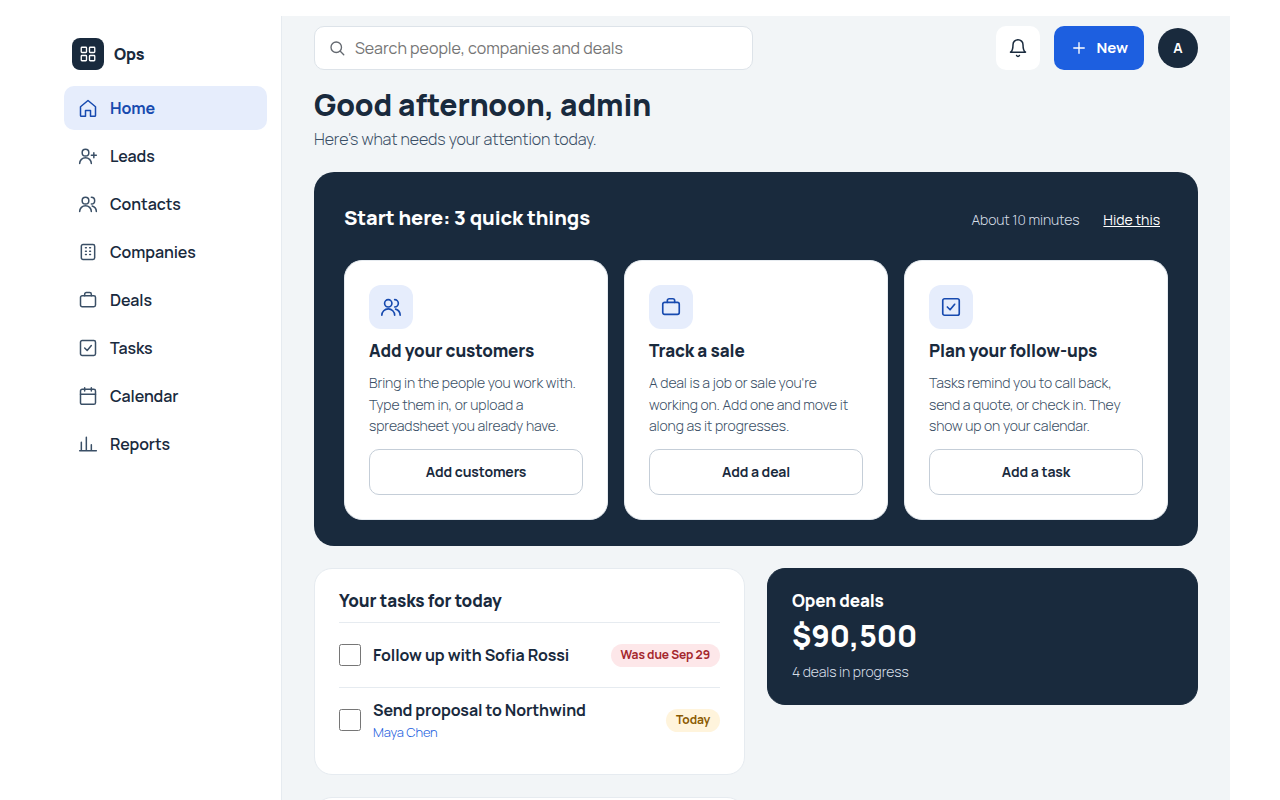
Free Start here on the home screen. CRM adds three cards to the Start here panel on the Ops home screen: Add your customers (opens Contacts), Track a sale (adds a deal) and Plan your follow-ups (adds a task). Each ticks itself off once there is a contact, deal or task the person can view that isn't practice data. CRM also fills Your tasks for today with the person's own open tasks due today or earlier, each with a checkbox that marks it Completed and the name of the contact, company or deal it's linked to. Docs
Free Open deals on the home screen. An Open deals card beside Your tasks for today shows the total Amount of the deals the person can view that aren't in a won or lost stage of any pipeline, in the site currency, with "5 deals in progress" (or "1 deal in progress") under it; clicking it opens the Deals board. With none, it says "No deals in progress" and offers Add a deal to people who can add deals. People who can't view deals don't see it. It shows on phones too. Docs
Free Contacts, Deals and Tasks on the phone's bottom bar. On phones, the bottom bar holds Home, Contacts, Deals, Tasks and More, and Leads, Companies, Calendar and Reports are under More. People who can't view one of those three get the next module they can view in its place. Record pages show large buttons: Call (for a lead, contact or company with a phone number), Email (leads and contacts) and Task (contacts, companies and deals), and the Deals board shows one stage at a time with a chooser that offers the next stage first. Docs
Free Custom modules and fields, field types, hiding, renaming and the setup trash. Shared features: Modules and fields
Records and fields
Free Calculated Name and Expected revenue. On leads and contacts, Name is a formula field that joins First name and Last name with one space, so it is never typed in. On deals, Expected revenue is Amount times Probability divided by 100, shown as currency, and empty when either is empty. They are recalculated every time a record is saved. Docs
Free Summary fields on companies and contacts. Five rollup fields total linked deals and contacts, shown in a Summary section of 2 columns on the record page: on companies, Open deals, Open deal value, Won deal value and Contacts; on contacts, Open deals. Open means a Stage other than Closed won or Closed lost. They update as soon as a linked deal or contact changes, count every linked record whoever is looking, leave out records in the trash, and can be filtered, sorted and used in reports. Docs
Free Turn a lead into a customer. A lead's page shows a Lead tag and a Make a customer button, which opens a dialog: "Ready to do business with Tom?", a sentence saying nothing is lost, then rows for what will happen: "Tom becomes a contact" (New, or Already here when a contact with the lead's email exists), "Linked to their company" (Already here when a company with the lead's company name exists, or New company), and "Also start a deal", a checkbox that starts off and asks for the deal's name and close date when ticked. Change opens a full page with every choice. Not yet closes it; "Make Tom a customer" does it. The lead is turned into up to three linked records in one step: a company (optional, selected by default, filled from Company, Website, Phone and address), a contact (always, filled from the lead's name, title, email, phones, address, description and email opt out, and, on sites that got CRM with core 1.56.0 or later, How they found you) and a deal (optional, not selected by default, in Sales pipeline at Qualification, with the lead's How they found you as its Lead source). Sites that had CRM before keep their flow as it was; an admin can add the How they found you mapping in Ops > Setup. An existing company with the same name, or contact with the same email, is used. Everything is created together or nothing is. The lead's status becomes Became a customer, its notes, files and tags move to the contact, and it is kept read-only with a Became a customer tag and "Became a customer on (date), by (name):" followed by the records, and left out of lists unless a filter asks for converted records. The flow is named Turn a lead into a customer, with the words Make a customer, Became a customer and "Became a customer on {date}, by {name}:", which admins can change in Ops > Setup, along with turning the flow off or deleting it. Sites that had CRM before core 1.57.0 had it as Convert lead; an update gives it the new name and words only if it was untouched. Docs
Free Validation rules on deals. Two rules come built in. "Close date can't be in the past" applies to deals not at Closed won or Closed lost. "Amount is needed from Proposal on" requires an Amount at Proposal or Negotiation. They check when a deal is created or a field they use changes, including imports, mass actions, board moves and AI tools, but not automation rules or CRM sync. Admins can change, turn off or delete them in Ops > Setup. Docs
Free Record pages built around key details. Each module's Details card shows its key details first: Leads: Email, Phone, Company, Lead status, How they found you. Contacts: Email, Phone, Company, Address, How they found you. Companies: Phone, Website, Address, Industry. Deals: Amount, Stage, Close date, Company, Contact. Tasks: Due date, Status, Priority, Contact. Addresses show as one line, such as "1200 Oak Ave, Portland, OR 97214". A contact's header shows its company and owner. Contacts, companies and deals have an Add task button that opens a new task already linked to the record. Admins change the key details on each module's Layout tab. Docs
Free Tasks and deals in What's happened and the Latest column. A contact's, company's or deal's What's happened shows its linked tasks and deals: "Task added: Call back about kitchen quote, due Thursday", "Task done:", "Deal added: Kitchen remodel, $5,200", and "Deal won:" or "Deal lost:" when a deal reaches a won or lost stage of any pipeline, each linked to the record and shown only to people who can view it. When a person makes them, the same events are the record's latest activity in the list's Latest column (names cut at 30 characters); people who can't view the task or deal see "Updated". Changes made by automation, sync or practice data don't count there. Docs
Free Related records. Record pages show linked records under Related, below the Details card and What's happened: a company's contacts, deals and tasks, a contact's deals and tasks, and a deal's tasks, up to 5 of each with View all and New links. Docs
Free Owners, field history, the 30-day record trash and mass actions. Shared features: Records
Free Teams and sharing. Put people in teams so a role with the Team level sees and works on teammates' leads, contacts, companies, deals and tasks, and share a single record with a coworker or a team for viewing or editing from its page. Shared features: Teams and sharing
Free Formula fields and rollup fields admins add themselves. Shared features: Formulas and rollups
Free Private File and Image fields. Shared features: File and image fields
Free Building and editing conversion flows. Shared features: Conversion flows
Free Adding and managing validation rules. Shared features: Validation rules
Lists and views
Free Six shared saved views. CRM adds these views once, when it first runs: My open tasks, My overdue tasks, Tasks due this week, My open deals, My leads and My contacts. They use Me and dates worked out from today, so each person sees their own records and the views stay correct every day. Ops Admins and people with Manage setup can change or delete them. A deleted view does not come back. Docs
Free Search, filters, sorting, columns, personal and shared views. Shared features: Lists, views and filters
Boards
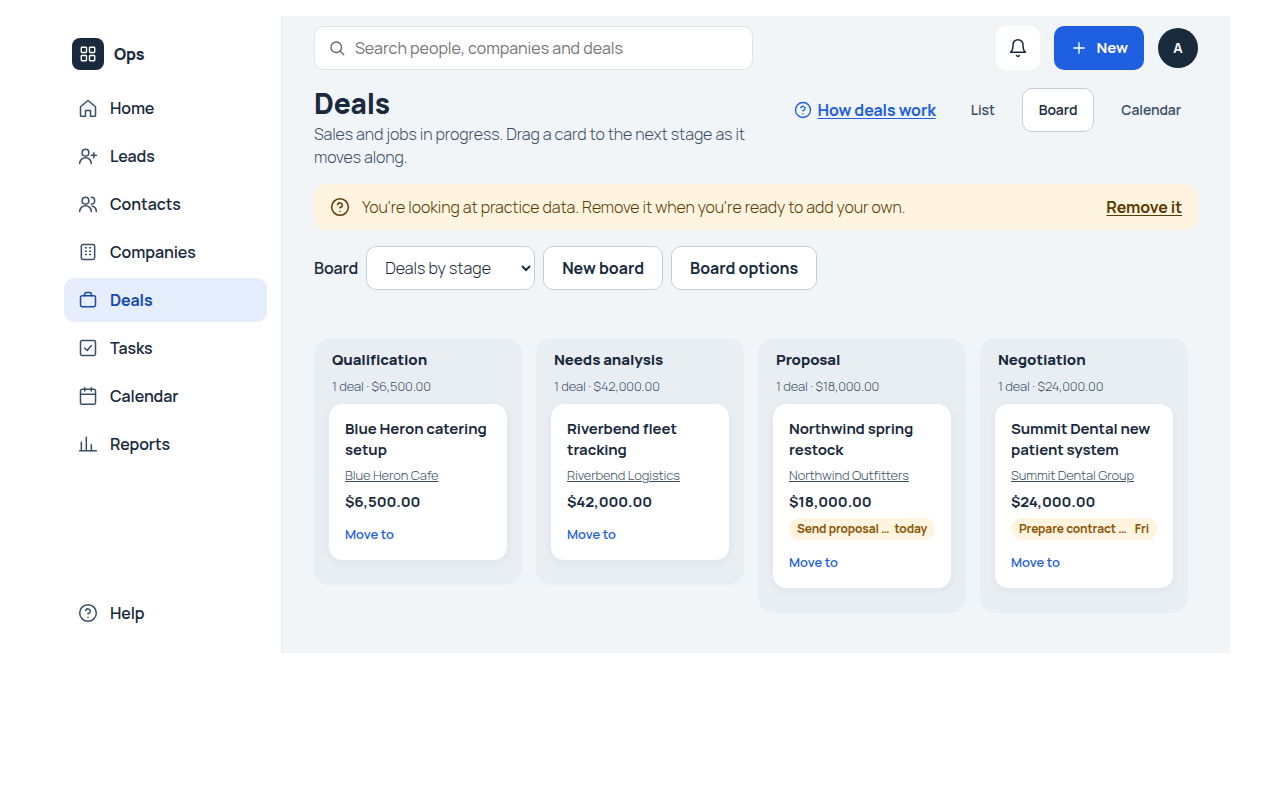
Free Three shared boards. Deals by stage (columns are the Sales pipeline's stages, each with its count and total Amount, such as "2 deals · $7,400.00"; cards show the Company, or the Contact when there is no company, and the Amount, plus a tag with the deal's next open task and its due day, such as "Call back Thu", red once overdue; sites that had CRM before core 1.57.0 keep cards showing Company, Amount and Close date), Leads by status (cards show Company and Email) and Tasks by status (cards show Due date and Priority). They are added once, when CRM first runs. Moving a card saves the record with the same permissions and checks as editing it. Admins can add more boards, such as one for another pipeline. On phones, a board shows one column at a time, and tapping a deal opens a stage chooser with the next stage first, marked Next stage. Docs
Free Personal and shared boards, card fields and totals. Shared features: Boards
Calendar
Free Tasks and deals on a calendar. Tasks appear by Due date (or by Remind me at) and deals by Close date, on the Calendar tab above their lists. Dragging an item to another day reschedules it, and a new task or deal can be started on a day. Leads, contacts and companies have no calendar unless an admin adds a date field to them. Calendar in the side menu on the Ops page opens the Calendar screen, with tasks and deals together, colored by module; CRM marks Tasks as its main calendar, so tasks come first, in the first color. Docs
Free Month, week and list views, up to 1,000 records per period, and the Calendar screen of every calendar module. Shared features: Calendar
Pro Tasks and deals in each person's own Google or Outlook calendar. With MountDev Ops Pro covering CRM, each person with a connected Google Workspace or Microsoft 365 account can turn on calendar sync: the tasks (checked at first) and deals they own appear in a MountDev Ops calendar in their account, from 30 days ago to 365 days ahead, and moving one there changes its Due date or Close date in Ops, checked as them with their permissions and validation rules. Deleting an item there never deletes the task or deal. Calendar sync
Activity
Free Task reminders. Setting Remind me at on a task sends the task's owner a reminder in the notifications bell, and by email unless they turned reminder emails off. Reminders are checked every five minutes. No reminder is sent for a completed task, a task in the trash, or a task more than 24 hours past its reminder time. Docs
Free Notes, files, tags, mentions and What's happened on every CRM record. Shared features: Notes, files, tags and What's happened
Free The bell, assignment notices, following records and notification emails. Shared features: Notifications
Free Email from any CRM record with templates, merge fields and attachments, logged in What's happened, up to 60 emails per person per hour. Shared features: Email
Free Email opt out. Leads and contacts have an Email opt out checkbox. When it is ticked, the email screen shows "This person opted out of email." next to Send, and a person can still send. Turning a lead into a customer copies it to the contact. Docs
Pro Workflow emails skip opted-out people. With MountDev Ops Pro covering CRM, a workflow's Send an email step skips leads and contacts whose Email opt out is ticked. Workflows
Free The optional "Powered by MountDev Ops" line on customer emails. Shared features: Credit
Pro Emails from connected mailboxes on Leads and Contacts. With MountDev Ops Pro covering CRM, emails people send to and receive from a lead or contact in their connected Google Workspace or Microsoft 365 mailbox are logged on that record automatically, matched by its email address. Leads' and Contacts' email fields are on at first; an Ops Admin can choose others. Email sync
Automation
Free Rules for CRM records. CRM comes with no workflow or assignment rules. Admins add their own for any CRM module in Ops > Setup, such as creating a follow-up task when a deal reaches Negotiation. Assignment rules for Contacts and Companies also set the owner of CRM records created for new people and companies in other MountDev Ops apps. Docs
Free Workflow rules with one action each, assignment rules and the run log. Shared features: Automation
Free Up to 10 custom buttons per module. Shared features: Automation
Reports
Free Five shared reports. Pipeline by stage (column chart of open deals by stage, with count and sum of Amount), Won deals by month (line chart of won Amount by close month), Leads by source (donut chart), Deals closing this month (table of open deals closing this month) and Open tasks by owner (bar chart). They are added once, when CRM first runs, and listed under Ready-made on the Reports screen, each with a description: "Where your open sales stand", "Sales you closed each month", "Which marketing brings people in", "Sales you expect to close this month" and "Who has what on their plate". Sites that had CRM before core 1.58.0 get the descriptions once, on reports that still have their original name and no description. Each counts only the records the person opening it can view. Docs
Free Table, summary and chart reports, personal and shared. Shared features: Reports
Pro Sales overview dashboard and report emails. With MountDev Ops Pro covering CRM, a shared Sales overview dashboard is added once, when no dashboards exist yet: an Open deal value total (the sum of Amount on deals not Closed won or Closed lost) and CRM's starter reports, each built as the person viewing it. Any CRM report or dashboard can be emailed on a schedule to people with Ops access, built as each recipient. Dashboards and report emails
Import and export
Free CSV import with undo for 30 days, and CSV export of the records a person can view. Shared features: Import and export
Free Background jobs, such as CRM's Pipeline update. Shared features: Background jobs
Search
Free One search box across every module the person can view, including CRM names, emails and phone numbers, and recently viewed records. Shared features: Search
Duplicates
Free Duplicate checks set up. CRM sets duplicate fields once, when it first runs: Email, Phone and Mobile on leads and contacts, and Company name and Website on companies. Deals and tasks have none until an admin picks some. A possible duplicate only warns; people can still save. Docs
Free The duplicate warning, Find duplicates and merging two records. Shared features: Duplicates and merging
Privacy
Free Leads and contacts ready for privacy requests. Leads and contacts are covered by WordPress's export and erase tools from the start. A person is found by Email, and the personal fields are First name, Last name, Title, Email, Phone, Mobile, Street, City, State or region, Postal code, Country and Description. Companies, deals and tasks are not covered by default. Erasing keeps the record but empties personal fields and sets Last name to [erased]. Admins can change all of this in Ops > Setup. Docs
Free Exporting and erasing a person's data. Shared features: Privacy
Portal
Free Portal customers linked to CRM contacts. CRM adds no section of its own to the client portal. When CRM is installed, each portal customer is linked to the CRM contact with the same email address, shown in the CRM contact column of the Customer portal section on Ops > Roles and teams. Inviting a customer creates nothing in CRM. Docs
Free The client portal page and customer invitations. Shared features: Client portal
Customization
Free Change CRM to fit. Ops Admins and people with Manage setup can rename or hide any module or field, add fields and modules, edit dropdown choices (including built-in ones such as Lead status), change each record page's layout, and edit or delete the starter roles. Built-in modules and fields cannot be deleted, and built-in fields keep their type and settings apart from dropdown choices. The deal Pipeline and Stage choices are managed by CRM and changed only in the Pipelines section, at Ops > CRM or on the Deals Dropdown choices tab in Ops > Setup. Docs
Free Roles, Ops Admins, Manage roles and Manage setup. Shared features: Roles and permissions
Free Logo, header name, main color (your theme's accent color by default, or your own), currency and each person's time zone. CRM's screens take their fonts, colors, buttons and fields from your website's theme, on light and dark themes alike. Shared features: Settings
AI and MCP
Free Pipeline abilities. CRM registers four abilities in the WordPress Abilities API so AI assistants and other tools connected to the site can list, save, set the default for and delete pipelines, acting as the signed-in user with the same checks as the Ops > CRM screen. CRM does not include or require an MCP connection; the site owner chooses what to connect. See AI abilities. Docs
Free Abilities for records, setup, views, boards, reports, activity and more: every setup action on CRM's screens has one, one action per call; rules an AI agent saves stay off until a person turns them on; and AI changes are marked in history and the activity log. Shared features: AI and MCP
Screens
On the Ops page (front end)
The Ops page is the page with the [mountdev_ops] shortcode. Logged-out visitors are sent to the WordPress login. Every screen has its own bookmarkable address, such as ?mdo_app=crm&mdo_view=deals.
| Screen | Who can open it | What it is for |
|---|---|---|
| Ops home | Anyone with access to at least one Ops app | The greeting, CRM's Start here cards, the person's tasks for today (with checkboxes), the Open deals card and recently viewed records. CRM's modules, Calendar and Reports are in the side menu, or on phones on the bottom bar (Contacts, Deals and Tasks) and under More. |
| Leads, Contacts, Companies, Deals and Tasks lists | Anyone with a view permission for the module at any level (Own, Team or All), or with a record in it shared with them | Quick filters and saved views, search, filter, sort, pick columns, see each record's latest activity, and run mass actions. An empty module offers its first steps. |
| To-do tab (Tasks) | Anyone who can view tasks | Open tasks grouped Overdue, Today, This week and Later, with checkboxes and quick add. Tasks opens here unless the person picked List. |
| Board tab | Anyone who can view the module | Records as cards in columns, such as Deals by stage. |
| Calendar tab (Deals and Tasks) | Anyone who can view the module | Records by date; drag to reschedule. |
| Calendar screen | Anyone who can view deals or tasks | Tasks and deals (and dated records from other apps) together, colored by module. |
| Record page | Anyone who can view the record | The header with Email, Add task (contacts, companies and deals), Make a customer (leads), Edit and More (custom buttons, Follow, Share, Duplicate, Delete); the Details card with key details, tags and Show all details (fields by layout, with the Summary section); What's happened with notes, files, emails, changes and linked tasks and deals; Related lists, Linked in other apps and Merge. |
| Add and Edit forms | Create, or edit access to the record (Edit own, Edit the team's records, Edit all, or the record shared for editing) | Add or change a record in cards by layout section, with help texts, Save and add another, duplicate warnings and validation messages. |
| Trash | A delete permission for the module at any level | Restore records deleted in the last 30 days. |
| Make a customer dialog and full page (Leads) | People who can edit the lead and create the new records | Turn a lead into a customer: a contact, linked to their company, and a deal if wanted. |
| Find duplicates and Merge | Find: an edit permission at any level; merge: edit both records and delete the one merged away | Combine two records. |
| Email screen and Email templates | Send: anyone who can edit the record; templates: anyone who can view the module | Write and send an email from a record; manage personal and shared templates. |
| Reports | Anyone who can view at least one CRM module | CRM's ready-made reports and the person's own and shared ones, each with a description, beside the open report; build, share and download reports. |
| Import, Your imports and Your exports | Import and Create, or Export, for the module | Bring in CSV files, undo imports, download exports. |
| Search page | Anyone with Ops access | Search across every module the person can view. |
| Notifications bell, My settings and What's new | Anyone with Ops access | Notifications, the person's own time zone and email choices, and update notes. |
In wp-admin, under the Ops menu
| Screen | Who can open it | What it is for |
|---|---|---|
| Ops > Home | Ops Admins, and anyone with Manage roles or Manage setup in any app | Getting set up with CRM practice data (Ops Admins only), links to the other settings, Your server, and the CRM merge notice for linking other apps' records to CRM. |
| Ops > Setup | Ops Admins and people with Manage setup in CRM | CRM's modules, each with tabs for Fields, Layout, Dropdown choices (with tags, and the Pipelines section on Deals), Automations, Rules, Buttons and Privacy, plus Conversion flows and the setup trash. The CRM merge review screen is on other apps' Synced with CRM tabs. |
| Ops > Roles and teams | Ops Admins and people with Manage roles in CRM | People and CRM's roles, with a level (None, Own, Team or All) for viewing, editing and deleting each module. Ops Admins also manage teams, the customer portal (with each customer's CRM contact), Ops Admins and reassigning someone's work there. |
| Ops > Email and branding | Ops Admins | The sending address, calendar links, logo, header name, main color and the credit. |
| Ops > Activity log | Ops Admins | Setup, role, pipeline and other changes, kept for 365 days, and on its Background work tab every background job, such as Pipeline update, imports and exports. |
| Ops > CRM | Ops Admins and people with Manage setup in CRM | Links to Setup, Roles and teams and the Ops page, and the Pipelines section: the pipeline list, Add pipeline and Edit pipeline form, Make default, and the Delete pipeline form. |
| Tools > Export Personal Data and Erase Personal Data | People WordPress allows to handle privacy requests | WordPress's own privacy tools, which include CRM's leads and contacts. |
| Tools > Site Health | WordPress Administrators | The MountDev Ops HTTPS, server cron, Ops page and private files checks. |
Settings
CRM's own settings, at Ops > CRM (stored in the mountdev_ops_crm_settings option)
| Setting | Default | Where |
|---|---|---|
| Pipelines | One pipeline, Sales pipeline | Ops > CRM, Pipelines section |
| Default pipeline | Sales pipeline | Ops > CRM, Make default |
| Pipeline name | Sales pipeline | Ops > CRM, Edit |
| Stages of each pipeline (name, probability, type, order) | Qualification 10% Open, Needs analysis 20% Open, Proposal 60% Open, Negotiation 80% Open, Closed won 100% Won, Closed lost 0% Lost | Ops > CRM, Edit |
The option also holds schema_version and, only while an update is giving existing deals a pipeline, upgrade_after. These are internal and not changed by people.
CRM defaults that admins can change in Ops > Setup (created once; updates never put them back)
| Setting | Default | Where |
|---|---|---|
| Duplicate fields | Leads and Contacts: Email, Phone, Mobile. Companies: Company name, Website. Deals and Tasks: none | Ops > Setup, module, Duplicates |
| Personal data fields | Leads and Contacts: First name, Last name, Title, Email, Phone, Mobile, Street, City, State or region, Postal code, Country, Description | Ops > Setup, module, Fields |
| Fields that find a person | Leads and Contacts: Email | Ops > Setup, module, Privacy |
| Validation rules | Two on Deals, both on | Ops > Setup, Deals, Validation |
| Conversion flow | Turn a lead into a customer on Leads, turned on, with the words Make a customer, Became a customer and "Became a customer on {date}, by {name}:" | Ops > Setup, Conversion flows |
| Key details | Leads: Email, Phone, Company, Lead status, How they found you. Contacts: Email, Phone, Company, Address, How they found you. Companies: Phone, Website, Address, Industry. Deals: Amount, Stage, Close date, Company, Contact. Tasks: Due date, Status, Priority, Contact | Ops > Setup, module, Layout, Key detail |
| Record page layouts | All fields in order; Contacts in Who they are, Where they work and More about them; Companies and Contacts end with a Summary section of 2 columns | Ops > Setup, module, Layout |
| Workflow and assignment rules | None | Ops > Setup, module, Rules |
| Custom buttons | None | Ops > Setup, module, Buttons |
| Shared saved views | 6 (see Lists and views) | Ops page, buttons above each list and the calendar's View list (Manage setup to change) |
| Shared boards | 3 (see Boards) | Ops page, Board tab (Manage setup to change) |
| Shared reports | 5 (see Reports) | Ops page, Reports (Manage setup to change) |
| Starter roles | Manager, Team member, Viewer | Ops > Roles and teams |
Shared settings CRM uses, in wp-admin for Ops Admins: on Home, Business name, Currency (US dollar) and the Ops page (none until chosen); on Email and branding, the sending address (not set), Your look, and the credit (off in the free apps). Each person's time zone is in My settings on the Ops page (the site's by default). See Shared features: Settings and the settings docs.
Roles and permissions
Who can use CRM. Ops Admins can do everything in CRM without a role. WordPress Administrators are always Ops Admins. Everyone else needs a CRM role; a person has at most one role in CRM, and no role means no access to CRM.
Starter roles. Added once, when CRM is first installed. They are ordinary roles: rename them, change them, delete them or add your own. Updates never put them back. Their descriptions: Manager, "Sees and changes everything."; Team member, "Works on their own customers and deals."; Viewer, "Can look, but can't change anything." The guided setup offers them when inviting the team. Sites that installed CRM before core 1.53.0 keep the names they had then (Sales Manager, Sales Rep and Read Only) unless someone renamed them.
| Role | What it can do |
|---|---|
| Manager | Views, creates, edits and deletes all CRM records in every module, whoever owns them, changes owners, and imports and exports. |
| Team member | Creates records in every module, and views, edits and deletes only the records they own. Other people's records are hidden from them. |
| Viewer | Views all CRM records in every module and changes nothing. |
None of the starter roles has Manage roles or Manage setup.
Permissions in each module. Every CRM module, built-in or custom, has twelve permissions. For Deals they read:
| Permission | In plain words | Manager | Team member | Viewer |
|---|---|---|---|---|
| View own deals | See deals they own | Yes | Yes | Yes |
| View the team's records | See deals owned by anyone who shares a team with them | No (has All) | No | No (has All) |
| View all deals | See every deal | Yes | No | Yes |
| Create deals | Add deals | Yes | Yes | No |
| Edit own deals | Change deals they own | Yes | Yes | No |
| Edit the team's records | Change deals owned by anyone who shares a team with them | No (has All) | No | No |
| Edit all deals | Change any deal, and change owners | Yes | No | No |
| Delete own deals | Move deals they own to the trash | Yes | Yes | No |
| Delete the team's records | Move deals owned by anyone who shares a team with them to the trash | No (has All) | No | No |
| Delete all deals | Move any deal to the trash | Yes | No | No |
| Import deals | Import from a CSV file (also needs Create deals) | Yes | No | No |
| Export deals | Export the deals they can view to a CSV file | Yes | No | No |
The starter roles have the same permissions in Leads, Contacts, Companies and Tasks. On the role form these show as levels: Manager has All for viewing, editing and deleting, Team member has Own, and Viewer has All for viewing and None for editing and deleting. No starter role uses the Team level; admins can choose it on any role once they set up teams in Ops > Teams. Records can also be shared with a person or a team for viewing or editing. See Teams and sharing.
App-wide permissions, added to CRM by the shared core:
- Manage roles: create, edit, delete and assign CRM roles, limited to permissions the person has, and open Ops > Roles and teams.
- Manage setup: change CRM's modules, fields, layouts, rules, flows, shared views, boards, reports and templates, and manage pipelines at Ops > CRM.
CRM adds no other permissions of its own. A record a person cannot view is reported exactly as if it did not exist. See the CRM starter roles docs and Roles and permissions.
AI abilities
CRM's own abilities, all about deal pipelines:
| Ability | What it does | Reads, changes or deletes | Permission needed |
|---|---|---|---|
mountdev-ops/crm-list-pipelines | Lists the pipelines in order, with their stages, probabilities and types, and how many deals not in the trash each pipeline and stage has. | Reads | Access to CRM (any CRM role, or Ops Admin) |
mountdev-ops/crm-save-pipeline | Creates a pipeline, or changes a pipeline's name and stages. A stage that deals use can be removed by naming another stage of the same pipeline to move them to; they move in the background. | Changes | Ops Admin or Manage setup in CRM |
mountdev-ops/crm-set-default-pipeline | Makes a pipeline the default. | Changes | Ops Admin or Manage setup in CRM |
mountdev-ops/crm-delete-pipeline | Deletes a pipeline that is not the default. When deals use it, they are first moved in the background to the pipeline and stage given. | Deletes | Ops Admin or Manage setup in CRM |
CRM's records, setup, views, boards, reports, activity, teams, sharing and the rest are reached through the shared MountDev Ops abilities, which cover every setup action on CRM's screens, including CRM's pipelines above. Workflow, assignment and validation rules saved through an ability, including changes to CRM's own validation rules on deals, are saved turned off until a person turns them on in Ops > Setup. See Shared features: AI abilities and AI and MCP.
Connections and data
Outbound connections. CRM makes none of its own. Emails from records, notifications and job emails go through the site's own mail setup (wp_mail()), so they leave the site only through the mail service the site owner sets up. The credit line, when on, is a plain link that sends nothing unless someone clicks it.
Tables. Records are stored in these tables (wp_ is the site's table prefix):
wp_mountdev_ops_crm_leadswp_mountdev_ops_crm_contactswp_mountdev_ops_crm_accountswp_mountdev_ops_crm_dealswp_mountdev_ops_crm_taskswp_mountdev_ops_crm_c_<module>, one for each custom module added to CRM
CRM's modules, fields, layouts, roles, field history, views, boards, reports, rules, jobs, notes, files, tags and logged emails are kept in the shared MountDev Ops core tables, in rows that belong to CRM. See CRM's rows in core's tables and the suite's list of core tables.
Settings option. mountdev_ops_crm_settings, holding pipelines, schema_version and, during an update, upgrade_after. Docs
Deleting the plugin removes nothing. There is no uninstall step and no delete-data option. Data is removed by hand, as described in Removing your data.
What never leaves the site. No telemetry, tracking, analytics or calls home. No ability sends email, imports or exports records, so an AI tool cannot send CRM data out of the site by those routes. Export files are private downloads for the person who made them.
Privacy tools. Leads and contacts are included in WordPress's personal data export and erase tools from the start. Docs
The credit line. Customer-facing output (emails sent from records, portal invitations and the client portal) can end with one small line, "Powered by MountDev Ops". In the free apps it is off until an Ops Admin turns it on. With MountDev Ops Pro active it is on, reading "Powered by MountDev Ops Pro", unless an Ops Admin turns it off. An explicit choice always wins. Staff screens and staff emails never show it. Docs
Requirements
- PHP 8.3 or newer.
- WordPress 7.0 or newer (the plugin header and readme say
Requires at least: 7.0andRequires PHP: 8.3; tested up to WordPress 7.1). - MySQL 8.0 or newer, or MariaDB 10.6 or newer.
- HTTPS.
- WP-Cron run by a server cron job instead of page visits.
- JavaScript in the browser for the Ops page.
CRM refuses to activate when PHP, WordPress or the database is below the minimum, and stops running with a plain admin notice if the site later falls below it. HTTPS and server cron are checked in Site Health and on the wp-admin Home screen. Docs
Our commitment MountDev Ops is built security first. Your data stays on your server. Our plugins never phone home, and we never use analytics or tracking of any kind. The only exception is the MountDev Ops Pro license check, which sends only your license key and site address. Nothing else is sent anywhere unless you set it up yourself. Keeping that promise takes a properly configured server. MountDev Ops requires PHP 8.3 or newer, WordPress 7.0 or newer, MySQL 8.0 or MariaDB 10.6 or newer, HTTPS, and scheduled tasks run by a server cron job. Most shared hosting plans don't meet these requirements. We only support sites that do.
Free and Pro
| Feature | Free | Pro |
|---|---|---|
| Leads, Contacts, Companies, Deals and Tasks modules | Yes | Nothing added |
| Pipelines and stages, probability from stage | Yes | Nothing added |
| Calculated Name, Expected revenue and summary fields | Yes | Nothing added |
| Turn a lead into a customer flow | Yes | Nothing added |
| Validation rules on deals | Yes | Nothing added |
| Workflow rules on leads, contacts, companies, deals and tasks | Yes | Multi-step workflows with waits, If branches and date triggers, such as following up on proposals or chasing deals before their close date (Workflows) |
| Shared saved views, boards and reports | Yes | Dashboards (with a shared Sales overview added once) and scheduled report emails (Dashboards and report emails) |
| Tasks and deals calendar, task reminders | Yes | Tasks and deals each person owns also sync both ways with a MountDev Ops calendar in their connected Google or Outlook calendar (Calendar sync) |
| Duplicate checks and merging | Yes | Nothing added |
| Privacy export and erase for leads and contacts | Yes | Nothing added |
| CRM as the hub for other apps' people and companies | Yes | Nothing added |
| Practice data | Yes | Nothing added |
| Starter roles and every permission | Yes | Nothing added |
| Pipeline abilities | Yes | Nothing added |
| Email from records, logged in What's happened | Yes | Emails from each person's connected Google Workspace or Microsoft 365 mailbox are also logged on matching leads and contacts (Email sync) |
| Shared core features (email, notes, files, tags, rules, import and export, search, reports, portal) | Yes | See Shared features: Free and Pro |
With MountDev Ops Pro active, the promo card and footer band on wp-admin Ops screens are hidden, and the credit line is on by default and reads "Powered by MountDev Ops Pro".
The Free and Pro promise. MountDev Ops CRM is complete on its own. It has no trials, no quotas, no usage limits, no license keys and no features waiting for payment. Free and Pro are split by feature, never by count. Once a feature ships in a free app it stays free forever: it is never moved into Pro, limited, or put behind a license. A Pro feature may later become free, but never the other way. Docs
Limits and good to know
- AI agents: abilities do one action per call. Workflow, assignment and validation rules saved through an ability stay off until a person turns them on in Ops > Setup, and every change an agent makes is marked "AI agent" in history and "(by an AI agent)" in the activity log. See Shared features: Limits.
- Pipelines: up to 20 pipelines and 30 stages per pipeline. Names are 1 to 100 characters. Each pipeline needs at least one open, one won and one lost stage. The default pipeline cannot be deleted.
- Stage keys never change. Renaming a pipeline, stage, field or option changes only what people see. New keys come from the name, with
_2,_3added when a stage key is taken by any pipeline. - Removing a stage or pipeline deals use moves those deals in the background, 100 at a time, including deals in the trash. Until the move finishes, the stage or pipeline cannot be chosen, but deals still in it keep working.
- Won and lost are by stage key in the built-in items. The summary fields, the My open deals view, the Pipeline by stage and Deals closing this month reports, and the Close date rule treat a deal as open when its Stage is not Closed won or Closed lost. Won or lost stages you add to other pipelines count as open there unless you change those filters (the built-in summary fields cannot be changed; add your own rollup instead).
- Deals by stage shows the Sales pipeline only. Add a board for each other pipeline.
- Summary fields count every linked record, whoever is looking. A Team member who sees only their own deals still sees a company's full totals.
- Required fields: Last name on leads and contacts, Company name on companies, Deal name, Pipeline and Close date on deals, and Subject on tasks.
- Built-in modules and fields cannot be deleted, only renamed or hidden. A module's name field cannot be hidden.
- Up to 300 fields per module, and up to 40 lookup and user fields per module. These are technical limits, not paid limits.
- 30-day trash for records, notes, files and custom fields and modules. Anyone who could delete a record can restore it.
- Mass actions run on up to 100 records at once; "select all matching" above 100 runs in the background.
- Email: up to 60 emails per person per hour, 1 to 10 recipients plus up to 10 CC and 10 BCC, attachments from the record up to 10 MB in total. Replies go to the sender's own inbox and are not logged.
- Automation: free workflow rules have exactly one action each, by design. Rules only change data inside Ops and never email customers. Changes made by rules never trigger other rules.
- Imports run 100 rows at a time, up to 50,000 rows and 200 columns per file, and can be undone for 30 days. Exports over 100 records run in the background, and export files are deleted after 7 days.
- Leads that became customers are read-only, cannot be merged, and are left out of lists and boards unless a filter asks for them (Became a customer is Yes).
- Duplicates only warn; saving is never blocked.
- Task reminders are checked every five minutes, go to the task's owner, and are skipped for completed tasks, tasks in the trash, and times more than 24 hours past.
- The calendar shows up to 1,000 records for the period on screen.
- Validation rules apply to what people do (screens, imports, mass actions, AI tools, conversions), not to automation rules, CRM sync, cleanup or privacy erasure.
- Starter roles, views, boards, reports, rules and the Turn a lead into a customer flow are created once. A deleted one does not come back after an update.
- Deleting the plugin removes no data.
- Dates and times are stored in UTC and shown in each person's time zone. Reports and anything run as MountDev Ops use the site's time zone.
Questions people ask
Does MountDev Ops CRM send my data anywhere?
No. It never phones home and has no tracking or analytics. Your data stays in your site's database. The only outside connections are ones you set up yourself, such as your email service. Docs
What does my server need?
PHP 8.3 or newer, WordPress 7.0 or newer, MySQL 8.0 or MariaDB 10.6 or newer, HTTPS, and scheduled tasks run by a server cron job. Docs
Why won't the plugin activate?
Your site is below the minimum PHP, WordPress or database version. The activation message says which one. Ask your host to upgrade it. Docs
Where does my team use CRM?
On the Ops page: a page on your site with the [mountdev_ops] shortcode, chosen on the wp-admin Home screen. People sign in with their WordPress username and password and see only what their role allows. Docs
How do I give someone access to CRM?
Go to Ops > Roles and teams in wp-admin and give them a CRM role, such as Team member. Without a CRM role they cannot open CRM. Docs
What is the difference between Manager, Team member and Viewer?
Manager works with every record and can import and export. Team member creates records and works only with their own. Viewer views every record and changes nothing. Docs
Why can't a team member see a colleague's deal?
The Team member role only has the Own level. Records owned by other people are hidden as if they did not exist. Put the reps in a team in Ops > Roles and teams and give their role the Team level for deals, give the role All, or share the one deal with them from its page. Teams and sharing Docs
Why do company totals include deals a rep can't see?
Summary fields such as Open deal value count every linked deal, whoever is looking, so the company's numbers are always complete. Docs
How do I add or change a pipeline?
In wp-admin, go to Ops > CRM. Use Add pipeline, or Edit on a pipeline to change its name and stages. You need to be an Ops Admin or have Manage setup in CRM. Docs
Why can't I edit the Pipeline and Stage choices in Setup?
CRM manages them from your pipelines, so Setup shows them read-only. Change them in the Pipelines section, at Ops > CRM or at the end of the Deals Dropdown choices tab. Docs
Why can't I delete a pipeline?
The default pipeline cannot be deleted. Make another pipeline the default first. Docs
What happens to deals when I remove a stage?
If deals use it, you choose another stage of the same pipeline, and the deals are moved in the background. You get an email when it finishes, and the stage then disappears. Docs
Why did the deal's stage clear when I changed its pipeline?
A deal's stage must be one of its pipeline's stages. Pick a stage of the new pipeline. Docs
Why did the probability change on its own?
When a deal's stage changes, its probability becomes the stage's probability. Type your own to keep it until the stage changes again. Docs
Why can't I save a deal with a past close date?
The built-in rule "Close date can't be in the past" checks open deals when they are created or the close date or stage changes. An admin can change or turn it off in Ops > Setup. Docs
Why does a deal need an amount at Proposal?
The built-in rule "Amount is needed from Proposal on" requires an Amount at Proposal or Negotiation. An admin can change or turn it off. Docs
How do I turn a lead into a customer?
Open the lead and click Make a customer. The dialog shows what will happen: the new contact, their company (new or already here) and, if you tick Also start a deal, a new deal. Click "Make (name) a customer". Change opens a full page with every choice. Docs
Where did my lead go after it became a customer?
It is kept, read-only, with the tag Became a customer, and left out of the list and board. Filter the Leads list on Converted is Yes to find it. Docs
Can I rename or hide modules and fields?
Yes, in Ops > Setup. Built-in modules and fields can be renamed or hidden but not deleted. Hidden fields keep their values. Docs
Can I add my own fields and modules?
Yes, in Ops > Setup, up to 300 fields per module. Custom modules get the same twelve permissions as built-in ones. Docs
How do I get reminded about a task?
Set Remind me at on the task. Its owner gets a notification, and an email unless they turned reminder emails off. Docs
Why didn't my reminder arrive?
Reminders are checked every five minutes and need the server cron job running. None is sent for a completed task, a task in the trash, or a reminder more than 24 hours late. Docs
How do I email a contact from CRM?
Open the record and click Send email. An Ops Admin must first set a sending address at Ops > Email and branding in wp-admin. Docs
Is there a limit on emails?
Each person can send up to 60 emails an hour from records, with attachments up to 10 MB in total. Docs
Can I import my contacts from a spreadsheet?
Yes. Save it as a CSV file and import it from the Contacts list. You need Import and Create for the module. Imports can be undone for 30 days. Docs
Can I automate follow-up tasks?
Yes. Add a workflow rule in Ops > Setup, such as creating a task when a deal reaches Negotiation. Each free rule does one thing. Docs
Does CRM warn me about duplicates?
Yes. Leads and contacts are checked on email and phone numbers, and companies on name and website. You can still save, or merge the two records. Docs
How do I handle a privacy request?
Use WordPress's Tools > Export Personal Data or Erase Personal Data. Leads and contacts are found by email. Erasing keeps the record but removes the person's details. Docs
How do I try CRM with example records?
On the wp-admin Home screen, use the Practice data card to add practice data. Remove it in one step when you are done. Docs
What happens to my data if I delete the plugin?
Nothing is removed. Your records stay in the database and come back if you reinstall. To remove them, follow the removing your data steps. Docs
How does CRM work with my other MountDev Ops apps?
CRM holds your people and companies for every app. Other apps link their records to CRM contacts by email and companies by name, and shared details stay the same. Docs
Can an AI assistant work with my CRM?
Yes, through WordPress abilities, acting as the signed-in user with the same permissions as the screens. Every setup action on CRM's screens has an ability. Rules an AI agent saves stay off until you turn them on, and its changes are marked "AI agent" in history. No ability sends email, imports or exports. Docs
Is there a paid version, and will free features ever be locked?
MountDev Ops Pro adds features for growing teams. Everything in the free CRM stays free forever, with no trials or limits. Docs
What does "Powered by MountDev Ops" mean, and can I turn it off?
It is an optional line on emails your customers receive and in the client portal. It is off in the free apps until you turn it on, and you can change it at any time on the wp-admin Ops screen. Docs